

How to Change Snapchat Username – Have you ever looked at your Snapchat username and thought, “Why did I choose that?” You’re not alone.
Many people create a Snapchat account quickly and pick a random username without giving it much thought. Later, when they start using the app regularly, they often want a username that looks more professional, memorable, or simply reflects who they are today.
The good news is that Snapchat now allows users to change their usernames without creating a new account. In this guide, you’ll learn exactly how to change your Snapchat username, what requirements you need to meet, and what happens after the change.
Table of Contents
Can You Change Your Snapchat Username?
Yes, Snapchat officially allows users to change their username.
However, there is one important limitation: you can only change your username once every 12 months. Because of this, it’s worth taking a little extra time to choose a username you’ll be happy with for the long term.
Username vs. Display Name: What’s the Difference?
Many Snapchat users confuse usernames with display names, but they are actually different.
Snapchat Username
Your username is your unique Snapchat identity. People can use it to find and add you on the platform.
Snapchat Display Name
Your display name is the name that appears to your friends. Unlike your username, you can change your display name whenever you want.
If you only want a different name to appear on your profile, changing your display name may be enough. But if you want to change your actual Snapchat ID, you’ll need to update your username.
Things to Know Before Changing Your Username
Before you begin, make sure that:
- You are logged into your Snapchat account.
- Your Snapchat app is updated to the latest version.
- Your preferred username is available.
- You haven’t changed your username within the last 12 months.
If any of these conditions aren’t met, you may not be able to change your username.
How to Change Your Snapchat Username
Follow these simple steps:-
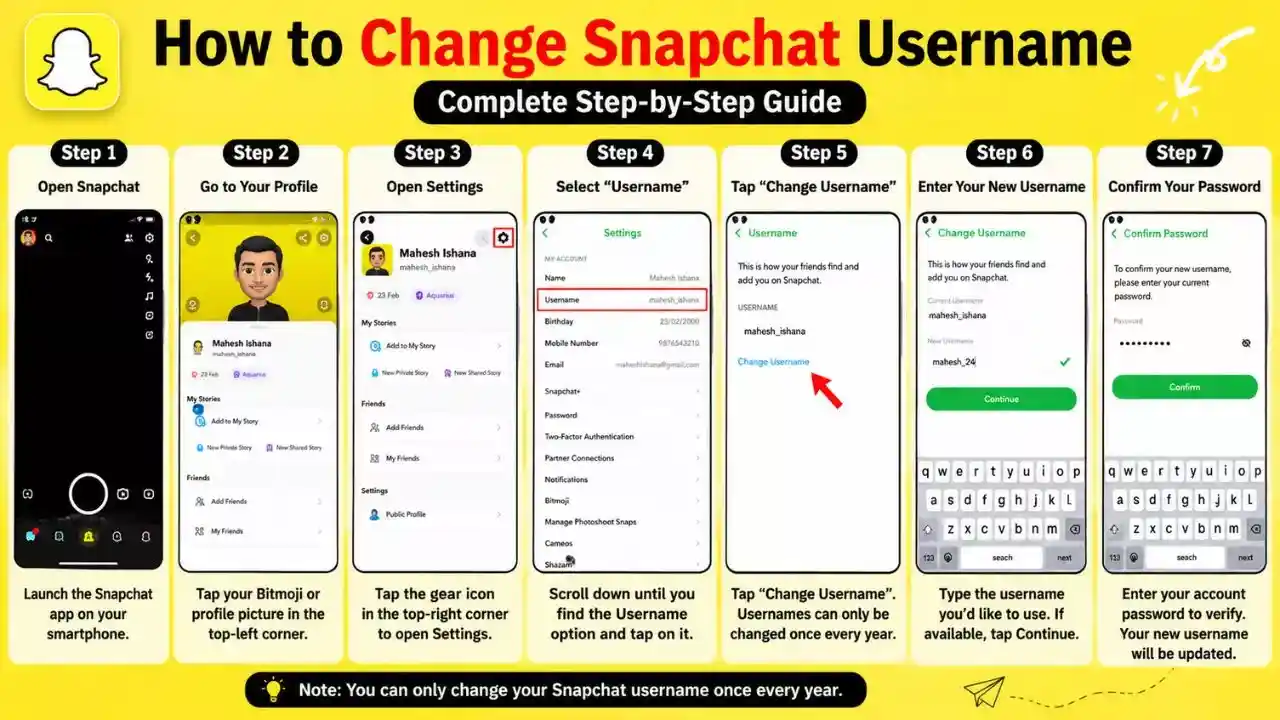
Step 1: Open Snapchat
Launch the Snapchat app on your smartphone.
Step 2: Go to Your Profile
Tap your Bitmoji or profile picture in the top-left corner of the screen.
Step 3: Open Settings
Tap the gear icon in the top-right corner to access your account settings.
Step 4: Select “Username”
Scroll down until you find the Username option and tap on it.
Step 5: Tap “Change Username”
You’ll see an option called Change Username. Tap it to continue.
Snapchat will display a message reminding you that usernames can only be changed once every year.
Step 6: Enter Your New Username
Type the username you’d like to use.
If the username is available, Snapchat will allow you to move to the next step.
Step 7: Confirm Your Password
For security reasons, Snapchat may ask you to enter your account password.
After verification, your new username will be updated successfully.
What Happens After Changing Your Username?
One of the biggest concerns users have is whether changing a username will affect their account.
Fortunately, changing your username does not:
- Delete your friends
- Remove your chat history
- Affect your Snapchat streaks
- Delete your Memories
- Change your account settings
Only your username changes. Everything else stays exactly the same.
Read Also – How to Add Location in Snapchat Step By Step
Why Can’t I Change My Snapchat Username?
If you’re having trouble changing your username, one of the following reasons could be responsible.
1. You Changed It Recently
Snapchat only allows one username change every 12 months.
2. The Username Is Already Taken
Every Snapchat username must be unique. If someone else is already using your preferred username, you’ll need to choose a different one.
3. Your App Needs an Update
Older versions of Snapchat may not support all account features. Updating the app can often solve the issue.
4. Temporary Technical Problems
Occasionally, Snapchat may experience bugs or server issues. Restarting the app or trying again later may help.
Tips for Choosing a Good Snapchat Username
Choosing the right username can make your profile look more professional and easier to remember.
Here are a few tips:
- Keep it short and simple.
- Avoid unnecessary numbers and symbols.
- Make it easy to spell.
- Use a name that reflects your personality or interests.
- Choose something you’ll still like a year from now.
Examples:
- TravelWithAlex
- DailySnaps
- TechExplorer
- CreativeMinds
- SnapJourney
Frequently Asked Questions
Q1. Is changing a Snapchat username free?
Yes. Snapchat does not charge any fee for changing your username.
Q2. Will changing my username remove my friends?
No. Your friends list will remain exactly the same.
Q3. Will I lose my Snapchat streaks?
No. Your streaks, chats, and Memories will stay safe.
Q4. Can I change my Snapchat username every month?
No. Snapchat currently allows only one username change every 12 months.
Final Thoughts
Changing your Snapchat username is a quick and simple process that can help you refresh your online identity. Whether your old username no longer represents you or you simply want something more professional, Snapchat makes the process easy.
Just remember that you can only change your username once every 12 months, so choose carefully before confirming your new one. A well-chosen username can make your profile look cleaner, more memorable, and easier for friends to find.